
Conversational analytics
Your team asks a question
Gigi, our AI agent answers directly via Slack, Teams, WhatsApp etc
An AI analytics agent that runs on your own governed data foundation.
Your team gets the answer directly in the chat, without waiting in line.
A data analyst at your fingertips for marketing, finance, operations and more.
Runs 24/7
Answers in < 2 mins
Your metric definitions, enforced
Confidence score on every answer
LIVE DEMO
See Gigi in action
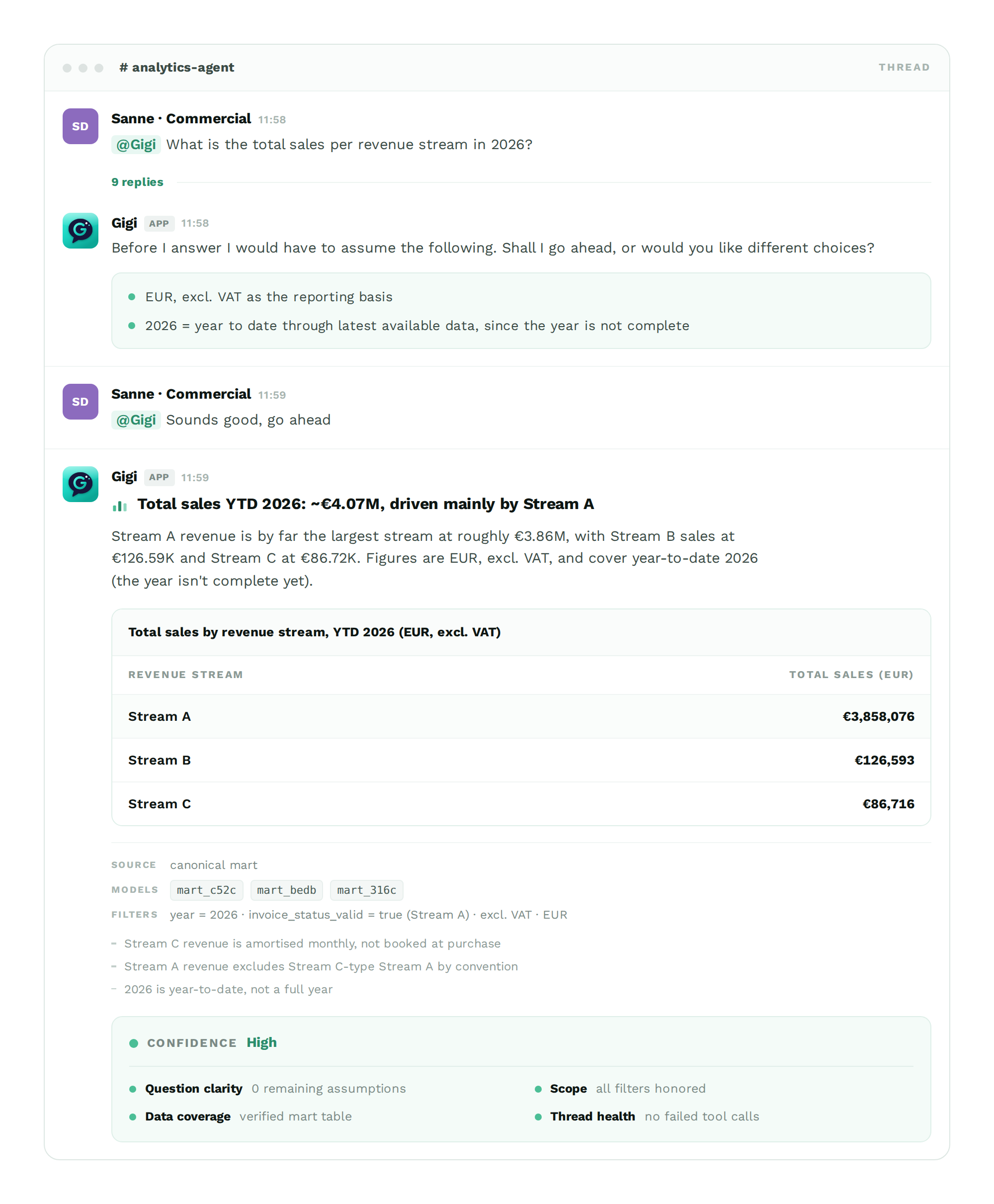
Business questions typed in Slack, clarifying questions asked back. Then the answer, with tables, the sources and the confidence score attached.
Gigi asks first
Gigi confirms which definitions it’s about to use before it answers
Gigi answers in the thread
The numbers, in a table or chart, and the main takeaways
Gigi shows its confidence
A score on every answer, with four checks behind it
Where analytics time goes today
Business owners

Hunting through dashboards
The right number is somewhere in the dashboard, and cant be found

Days to weeks for an answer
The answer arrives after the decision window has closed

Decisions made without data
People fall back on intuition, or on their own version of the numbers
Data team

Repeating questions
Answering the same already answered questions, each quarter

Redundant execution
Rebuilds of the same dashboard, exporting the same datasets

Time spent on ‘easy’ questions
Analysts spend time on easy questions rather than complex analytical topics
Introducing Gigi
The analytics agent that answers questions where your team already asks them
Gigi lives in your work communication platform, such as Slack, Teams, WhatsApp etc. Tag it with a question, either in a shared channel or in a direct message, and it opens a thread and answers in about two minutes. There it answers with the numbers, or a chart when needed, and the definitions it used to get there.
No dashboard to open, no table or names definitions to remember and no request to file.

Questions get asked where the work happens
Business questions rarely start in a BI tool. They come up mid-conversation, while someone is deciding something. Because Gigi is already in that conversation, asking is simple: no new tool, no login, no context switch.
For most people that’s the difference between asking and guessing
One language for the whole company
Gigi reads the definitions your data team already maintains. Revenue, active customer and margin mean what your company already agreed on what they mean, every time, company wide.
Rather than quietly choosing one for you, Gigi knows your conventions well enough to ask which definition you want.
Minutes, not days
Gigi runs 24/7, so there’s no line and nothing waiting for someone’s morning. A question asked at 18:40 is answered at 18:42.
Answers arrive while the decision window is still open, which is when they’re most needed.
Ask in an open channel, or in a dm
Tag @Gigi with the question and it answers wherever it was tagged; in a shared channel where the rest of the team should see it, or in a direct message when you would rather work something out on your own first.
Nothing to route, nothing to set up per team.
It answers in a thread, and remembers
Every answer opens a thread, so the channel stays readable and the whole exchange stays in one place.
Follow-ups behave like a conversation: ask “and the month before?” and Gigi keeps the context of the thread instead of making you ask again.
On the record, when you want it to be
Asked in a shared channel, the question, the number and the reasoning behind it stays visible to the team; preventing the same question from coming around every quarter.
Your data team gets a live view of what the business actually wants to know. This way Gigi handles repeating questions while your data team gets the work that actually needs them.
Features
An answer is only useful if you can trust it. Everything below exists to make the numbers in the thread safe to act on.
For every answer
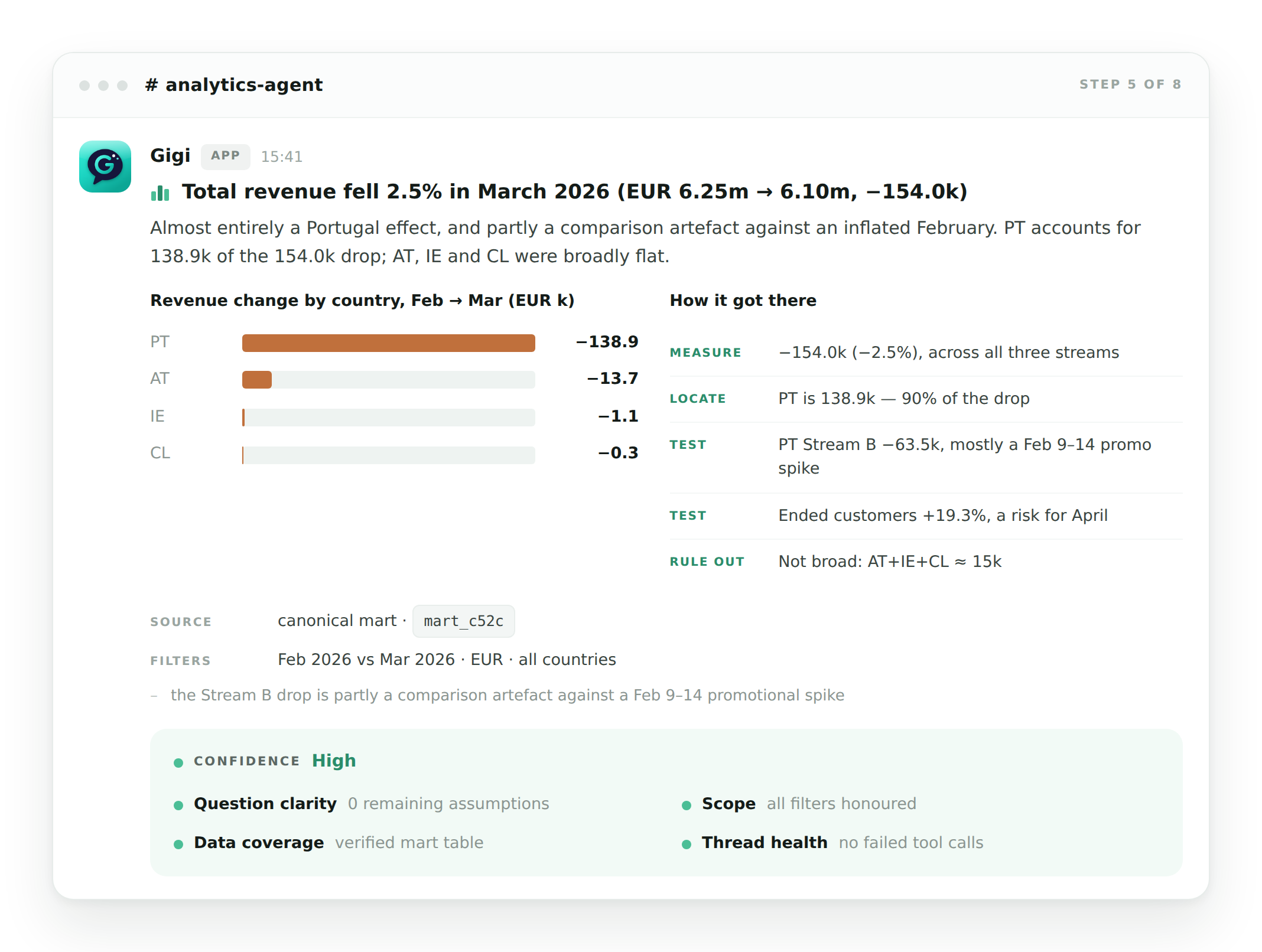
Gigi never returns a lone number. Each answer arrives with the finding stated in one line, the table underneath it, and a full record of how it came to the conclusion.
Gigi shows its work
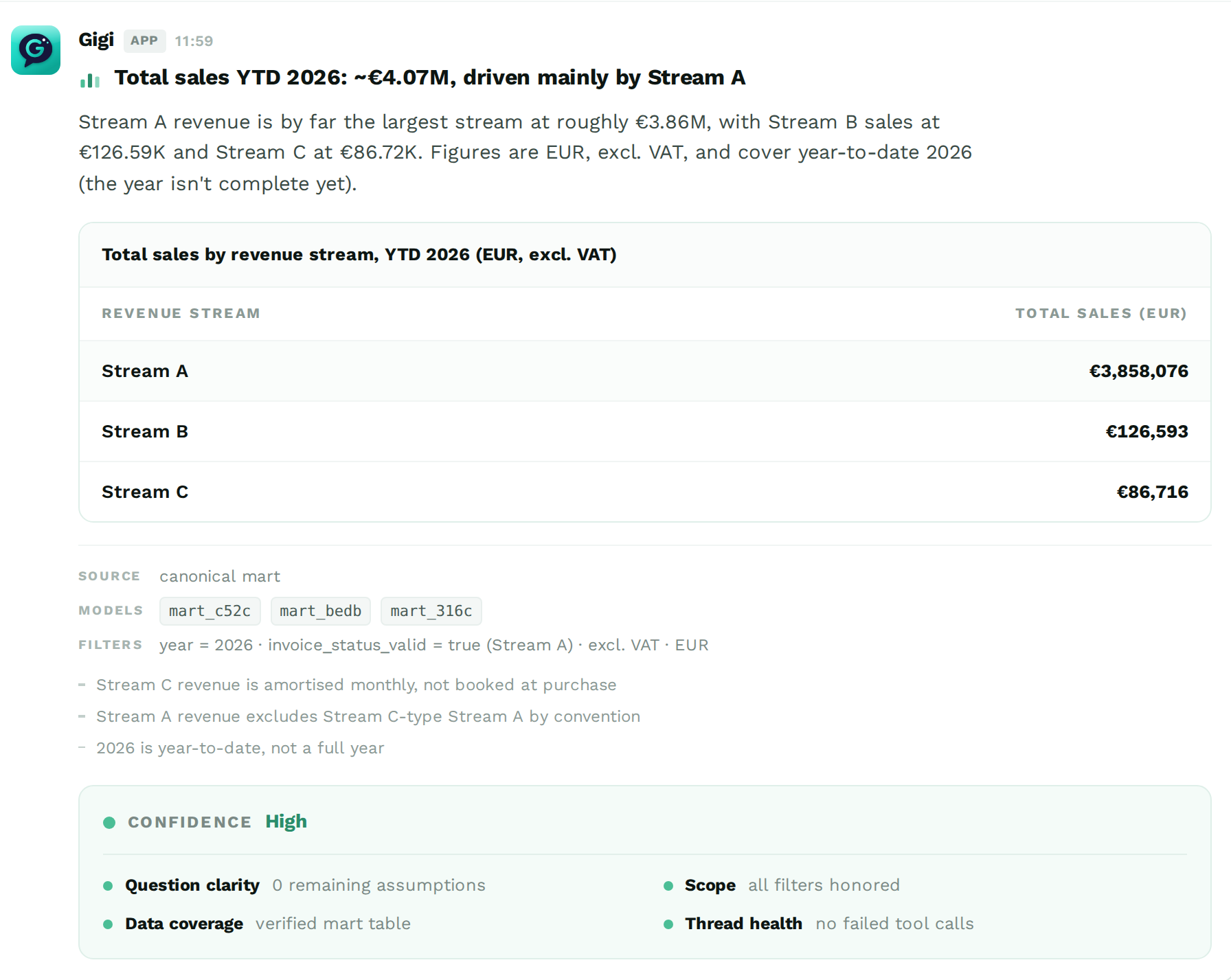
The finding first - the headline in a sentence, before the details
Table and chart in the thread - no export needed, no separate dashboard
Sources named - which tables and models were used and which filters were applied
Conventions stated - the business rules used, mentioned explicitly rather than assumed implicitly
A confidence score - graded on question clarity, scope, data coverage and thread health
Before the answer
Gigi asks instead of assuming
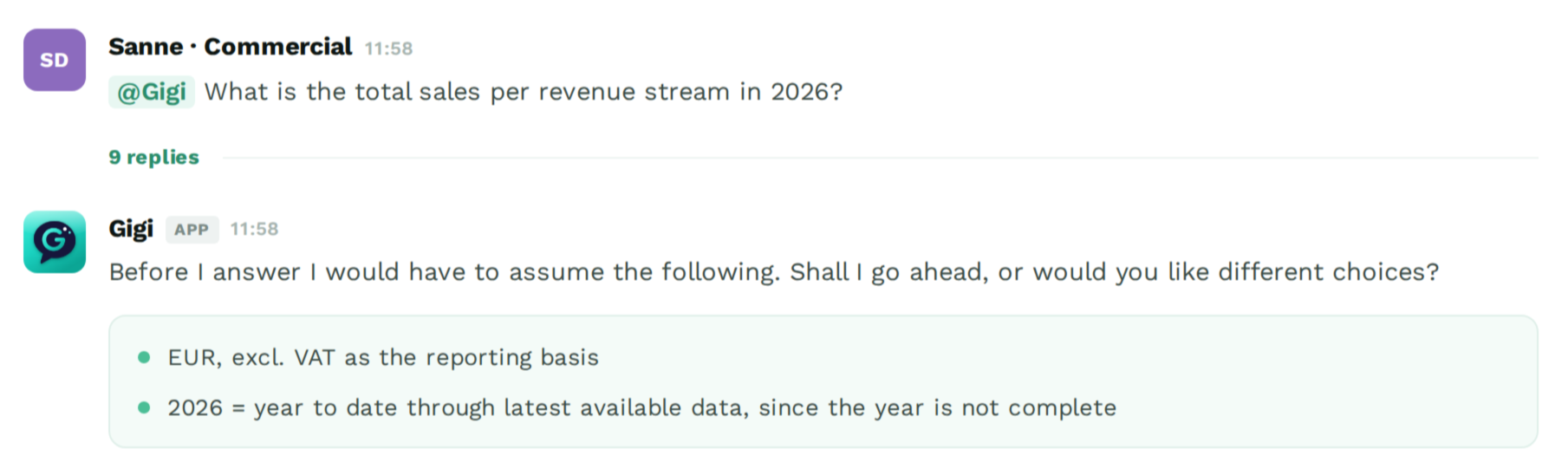
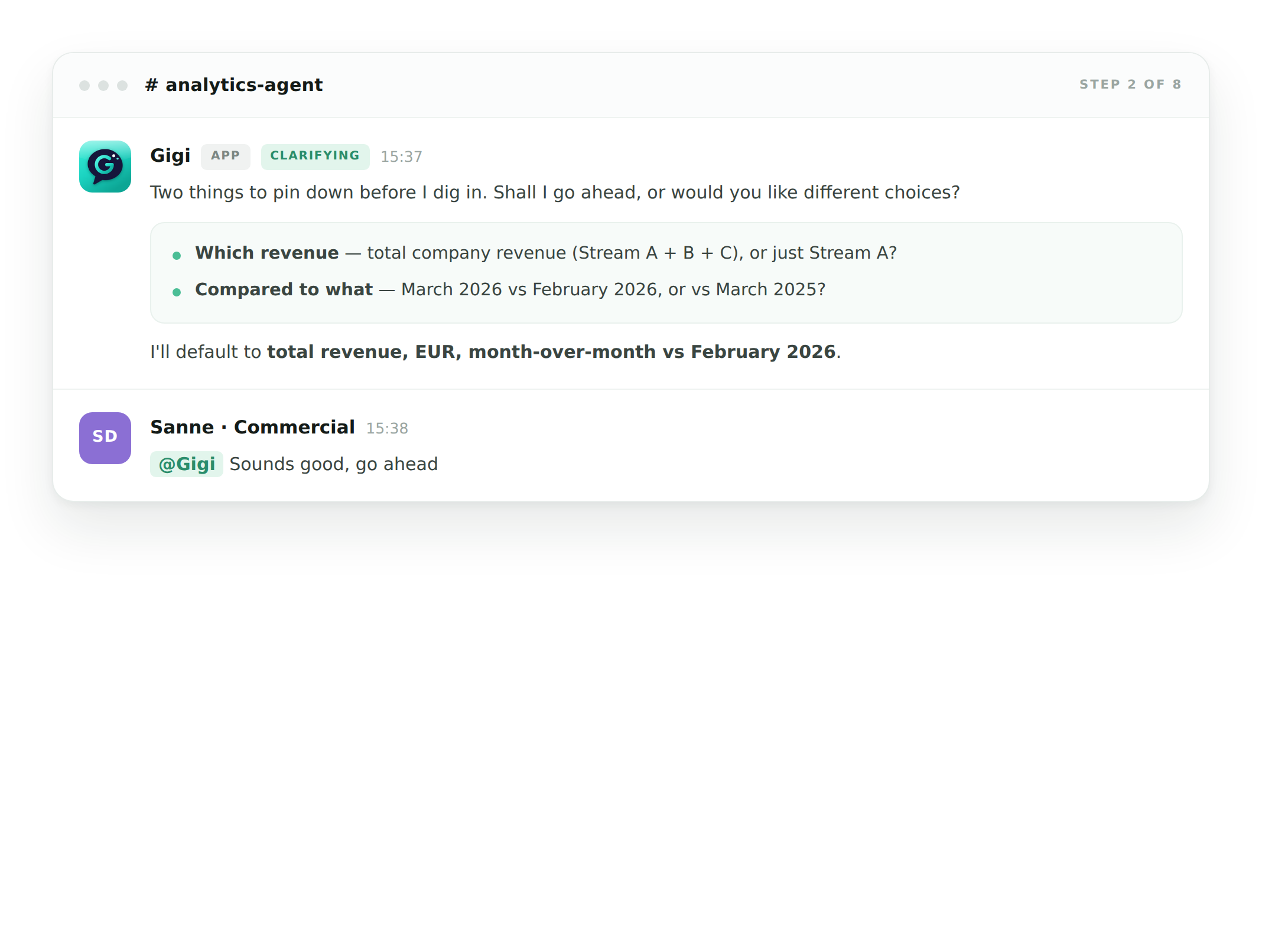
When a question has more than one reasonable interpretation, Gigi says so and offers the choice. You confirm in one message, then it answers.
A wrong assumption is the most expensive error in analytics, because nothing about the output looks wrong. This is the cheapest place to catch it.
Every morning
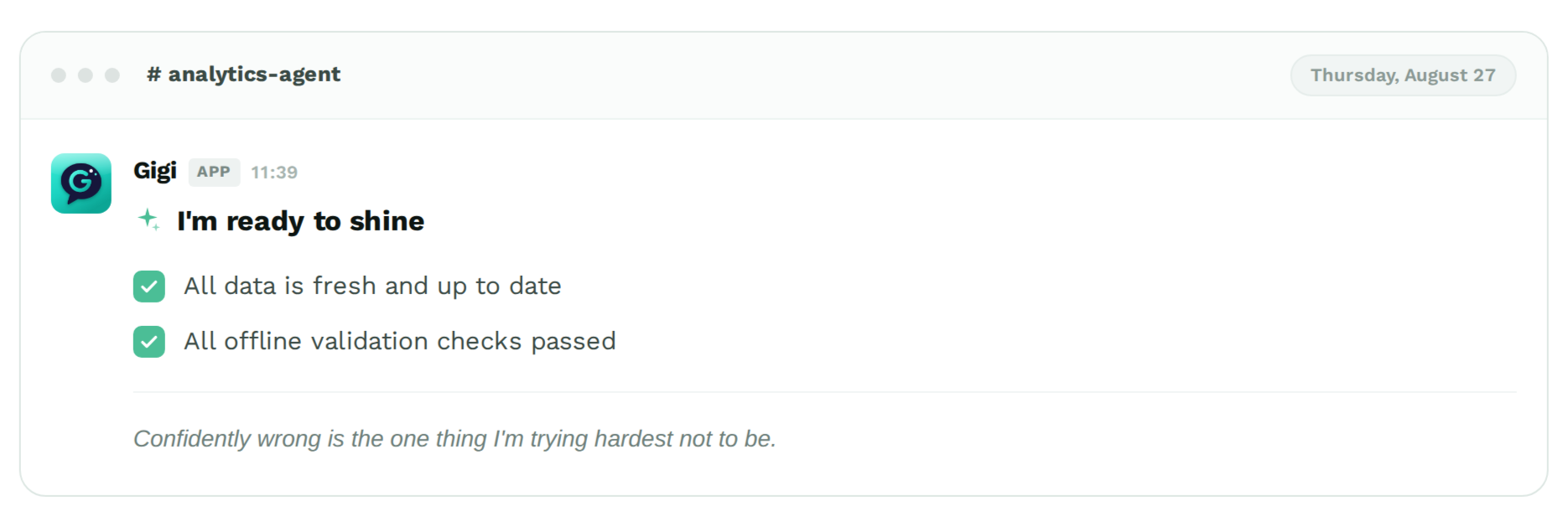
Gigi does a self diagnosis
Gigi runs a full validation pass every day — data freshness plus its own offline check suite — and posts the result in the channel. If something failed, you find out before you rely on a number, not after.
The same validations run again on every individual question, and a validation dashboard tracks how accuracy holds up over time.
To visualize the answers
Gigi uses Chartbuddy
In partnership with Chartbuddy
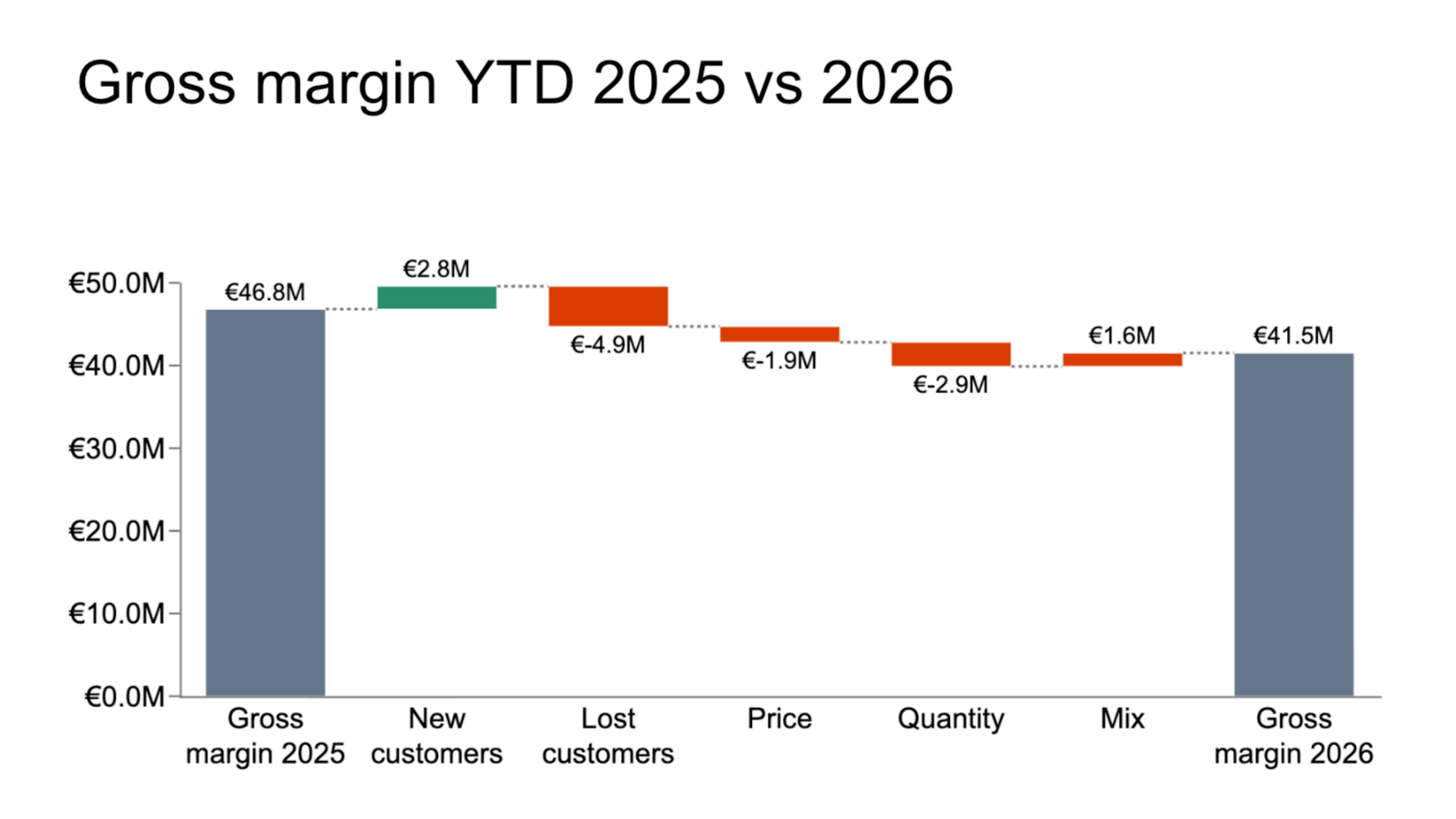
Ask Gigi a question and when the answer is worth showing, Gigi hands the numbers it just queried to Chartbuddy. It creates a chart that comes back finished and in your house style, with just the chart type needed to answer your question. The chart the seamlessly stays live between different apps.
One chart, every app — the same chart in Slack, WhatsApp, Google Slides, Google Sheets and PowerPoint. Moved, not rebuilt.
Editable, not a PNG — a live chart you can click into and change any detail.
Your house style, automatically — one brand style across every chart Gigi makes.
Always up to date — Gigi has a live connection to your data, so when your numbers change, so does the chart.
When the question is harder
Gigi finds the root cause
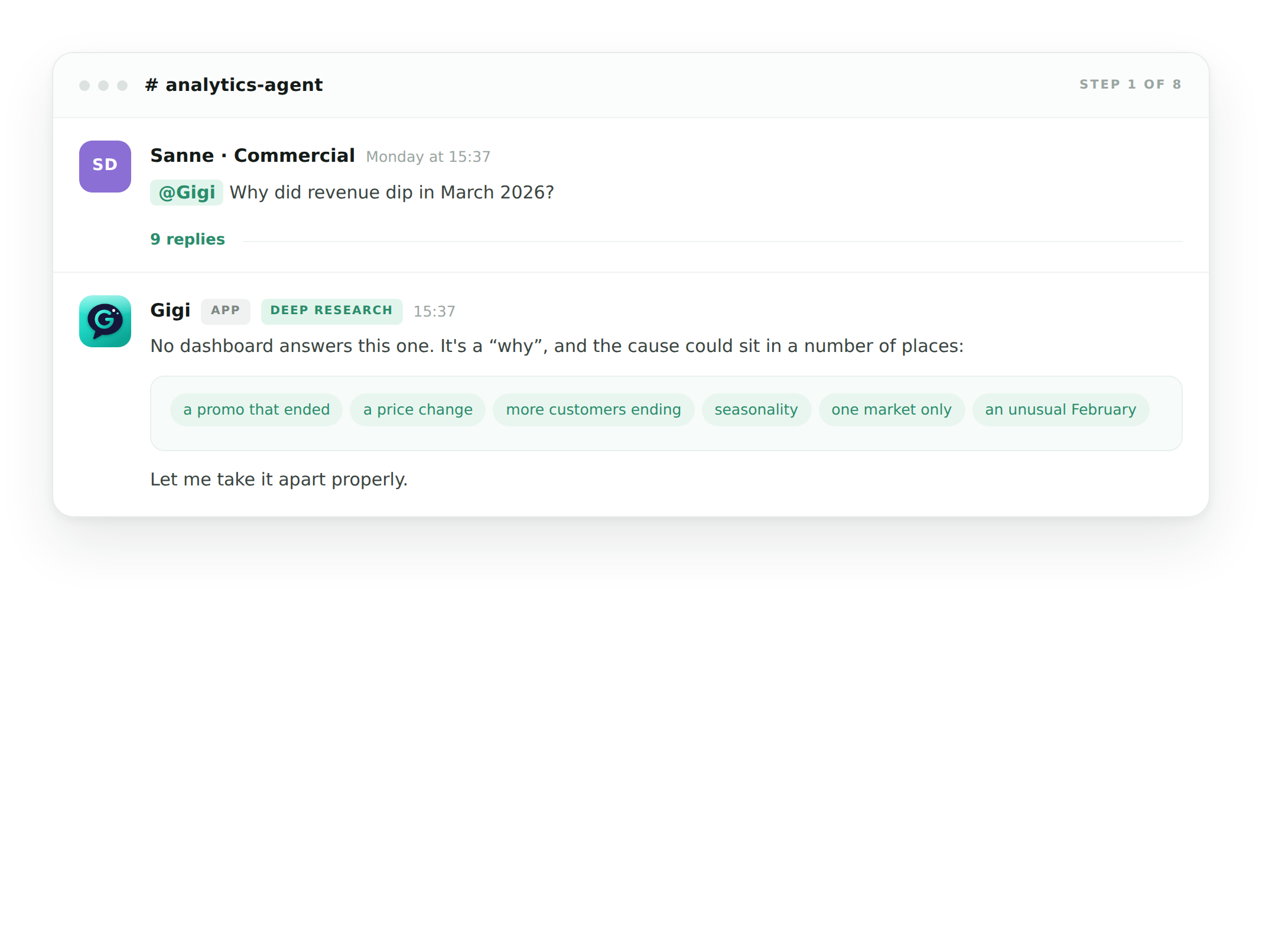
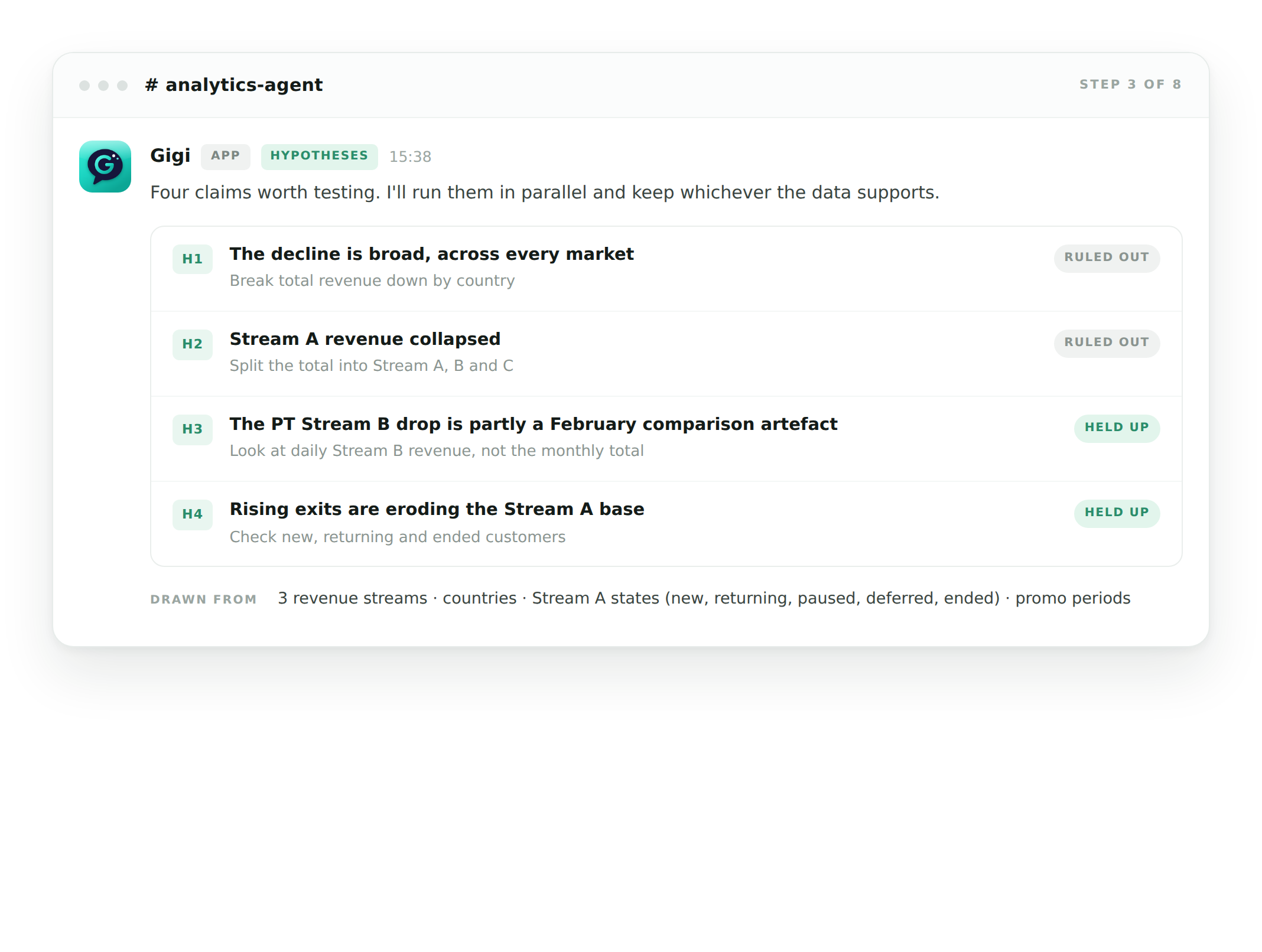
Some questions cannot be answered by peaking at a chart or metric. A question like: "Why did revenue dip in March 2026?" takes more effort to answer than a glance at a single dashboard. This is because a drop in revenue can come from any number of causes; an internal business decision, an external factor, or a comparison against a month that was itself unusual.
Gigi tackles "why" questions like this by leveraging its direct access to your data and the business context around it, without the need for an analyst. This way nobody has to invent the questions, write the queries, paste results into a spreadsheet and reason over them by hand.
Gigi writes the questions - part reasoning, part knowing how your data is built: channels, country groups, subscription states such as pause, skip and cancel
Several angles at once - hypotheses are tested in parallel rather than one after another
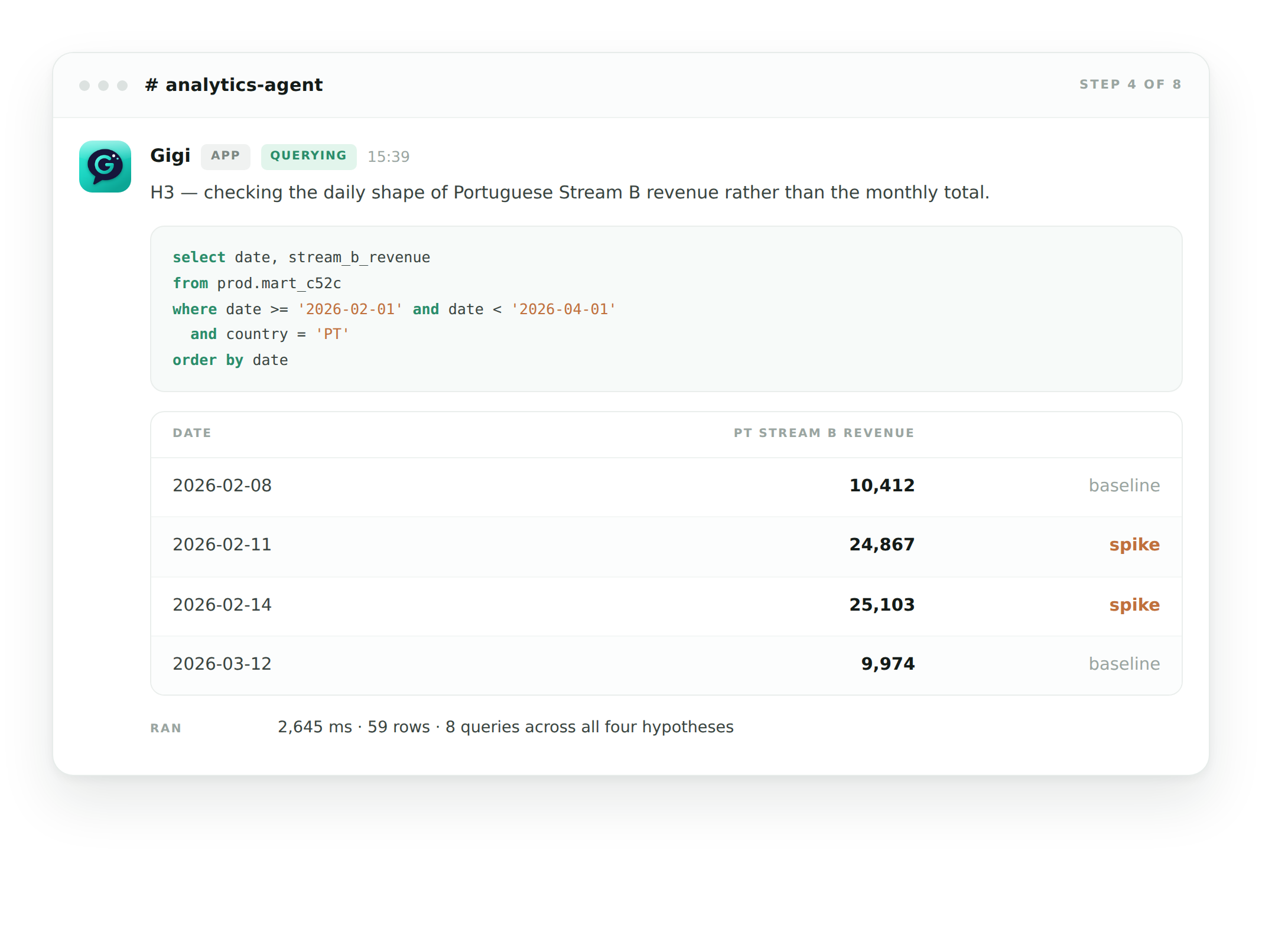
Queries written on the spot - new SQL against your warehouse, not a pre-built dashboard
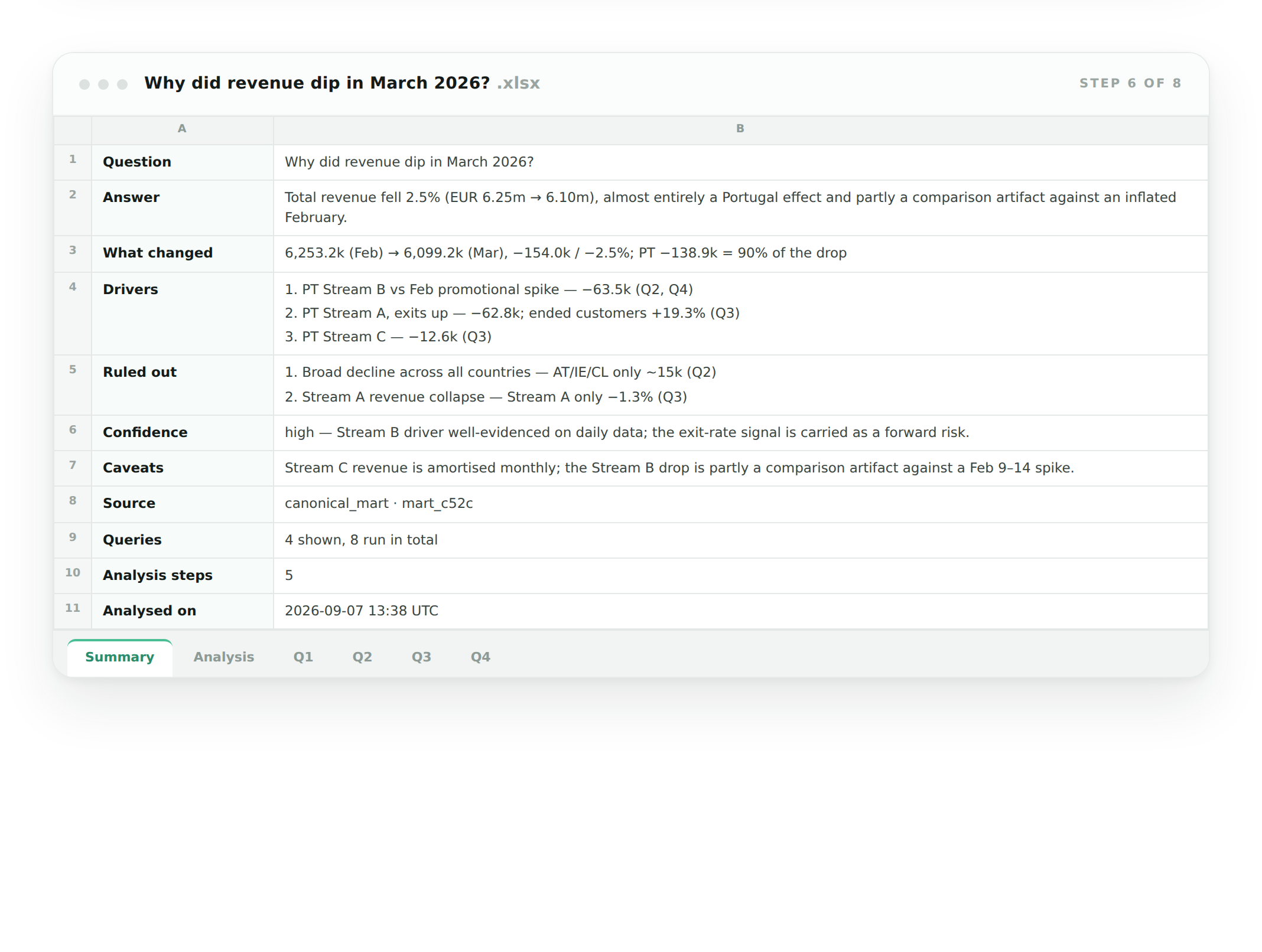
Handed over and editable - the full analysis in a spreadsheet, fully traceable
WATCH IT WORK
Gigi performs a Root Cause Analysis
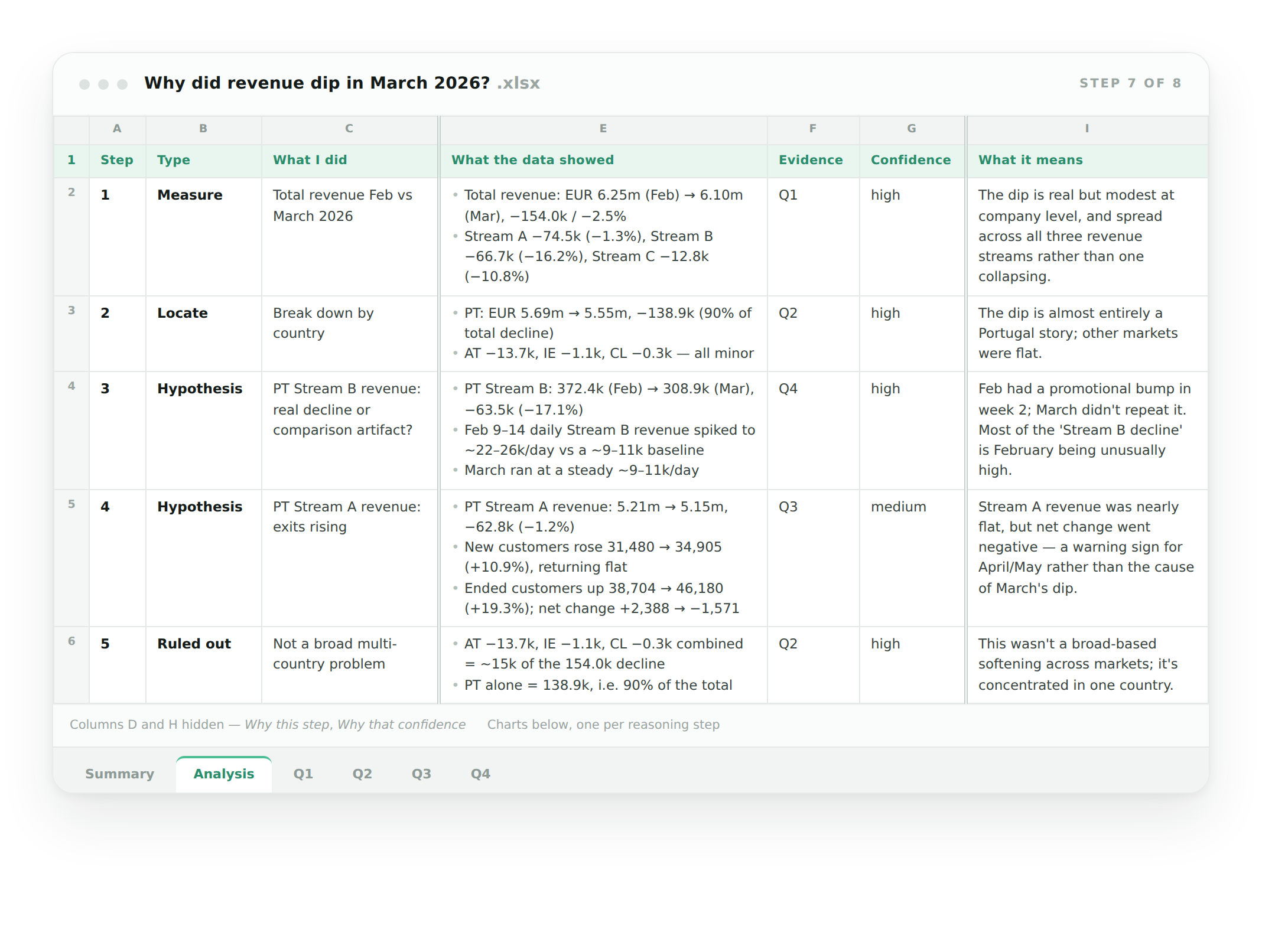
Ask Gigi "Why did revenue dip in March?" and get an in-depth analysis back in a sheet
Start with a question
A monthly revenue chart shows a dip in March, prompting a follow-up.
Summarize findings
A short summary of the findings, along with the evidence that supports the conclusion. All in a sheet.
Tested hypotheses
Gigi comes up with multiple hypotheses and uses your data to test them. Some are validated while others are rejected.
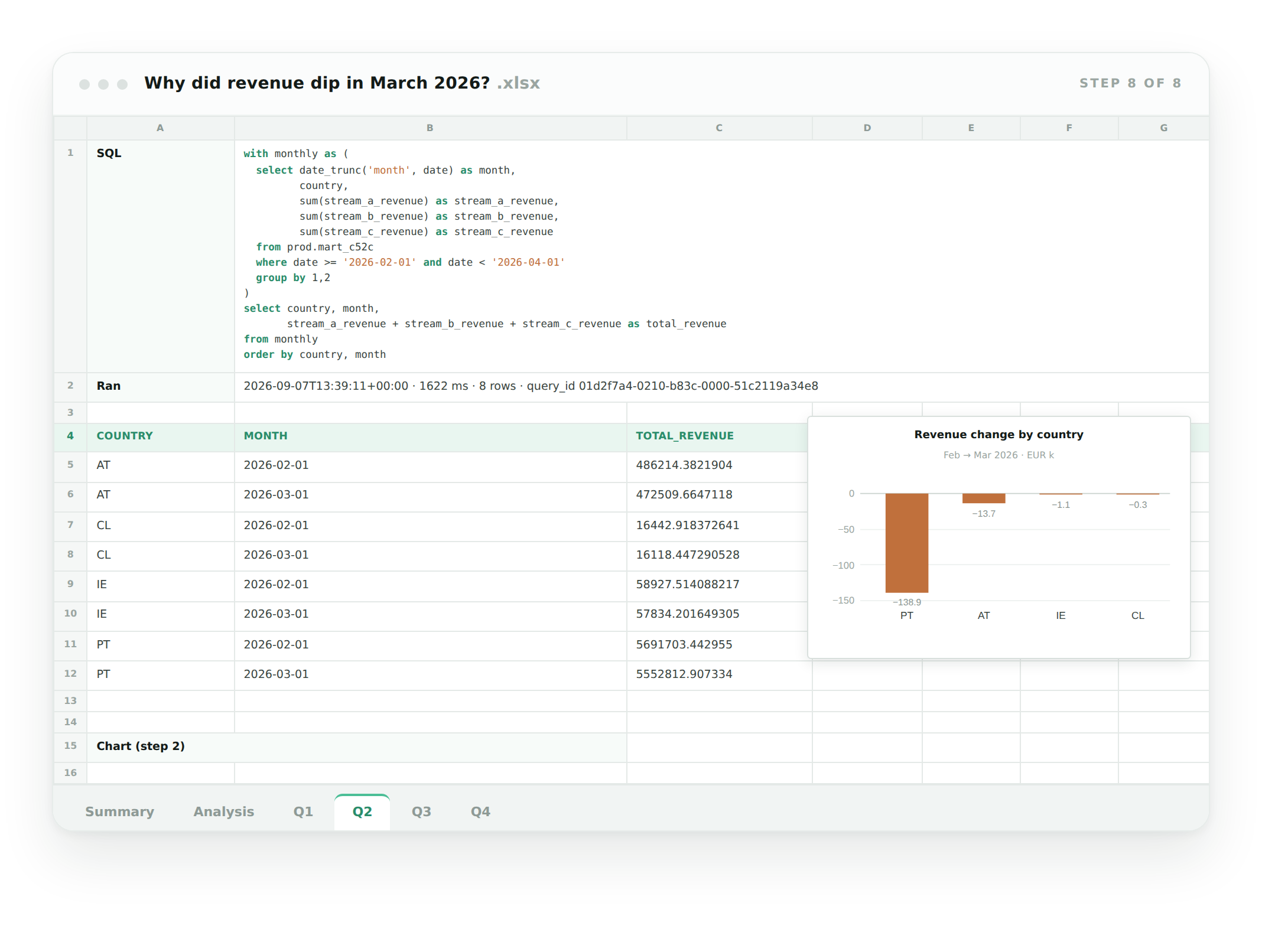
Traceable SQL
Each sub-question links to the query that answered it, so your data team can check or rerun it.
Also included
Validation dashboard
Check results and accuracy, tracked over time
Usage & value dashboard
Who is asking what, and what it’s saving
Automated data roadmap
Prioritized gaps, generated from real questions
Research suggestions
Topics that deserve a proper analysis, not a lookup
Cost transparency
Model choice is yours, token spend stays visible
Security & privacy
Permissions, data residency, what Gigi sees
Automated maintenance
Upkeep handled by us, not by your data team
More on the way
Improved continuously, carried across every implementation